 ChickyCurrent mood: Very happy
Current action: Playing pranks on the maid
 Porky
Porky
Current mood: Moody
Current action: Moving around restlessly
A quick snapshot.
The boys and I still haven't recovered from the flu. However Chicky has abundant of energy once he wakes up in the morning. Dolzer already ban the Ultraman Mebius & Ultraman Brothers ever since the window broke but it didn't deter Chicky from his Ultraman passion~.
In one minute, Chicky was happily ordering the maid to do his bidding, upsetting the neatly folded pile of clothes, blowing off the candles on the god's altar table and roll oranges on the floor like bowling ball. Came back to the room hiding under the bed sheet and plaguing me repetitively with:
Chicky: Mummy~ Where's "Chicky"? Where's "Chicky" mummy?
Then he went back to playing his imaginary Ultraman vs Dinosaur and Crocodile. Him being Ultraman as usual. With sword this time.
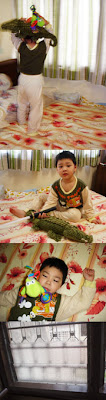 (Chicky wrestles with dinosaur and crocodile)
(Chicky chopping crocodile's head)
(Chicky got defeated by dinosaur)
(Window repaired)
Poor Porky however, not very happy with the flu. If only he knew how to blow his nose like Chicky. Could have gotten rid of those greenish phlegm that blocked his nose.
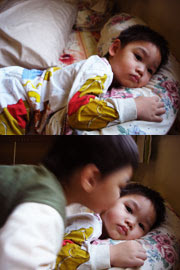 (Moody Porky)(A quick peck from Chicky)
Luckily Porky got an affectionate brother to soothe him. Hopefully he gets better over the weekend so Dolzer can bring the boys out for a treat. 
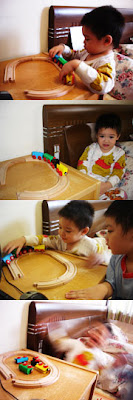 (Porky in his corner)(Got annoyed posing for pics)(Resume playing but Chicky came too close)(Lost his temper! Chicky fled)
As you can see, one of Porky's train tracks is missing. Been trying to look for it to no avail and somehow he is mightily pissed off about it. Probably the flu as well.
Grr... P1 the Menace. I'm really fed up with P1 W1MAX. Haven't been able to watch any anime for the past couple of weeks. Luckily now got blogging to keep my sanity in check.
Earlier been uploading post for 3 days straight and below are taken on that 3 days. To be honest, it's been like that ever since the technician came to check on our modem. P1 modem has 3 colour status:
GREEN means EXCELLENT SIGNAL
ORANGE means MODERATE SIGNAL
RED means NO SIGNAL
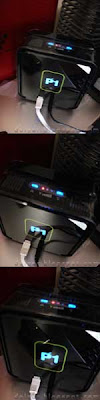 DAY 01 15.06.09
Status: CRIMSON RED

DAY 02 16.06.09
Status: CRIMSON RED
DAY 03 17.06.09
Status: CRIMSON RED
This is what P1 send via sms:
" PI is experiencing temporary service interruption that affects some of our subscribers. Affected users may experience limited to no service during this period. Our tech team is working to restore service to its full capacity. We will provide further updates as and when available. Thanks."
And via email:
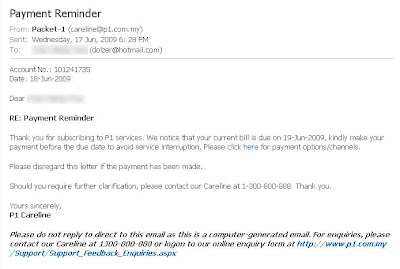
Would you pay?!!
 My trusty wireless Streamyx
  ~
~
So, back to my Streamyx connection for the time being. *sob* Ooh... the wireless is hidden below the CPU to prevent Porky from playing with it. The last time he took it out, he inserted into the computer's bass speaker air hole and it took us more than a week to discover it.
.........................................................................................................................................
Another successful experimentation on personalizing blog icon as you can see below:

 ~
~
I use:- Adobe Photoshop CS
- Blogger.com
Difficulty: EASY
Instruction
Creating the Art
Open Adobe Photoshop. Create image file size 50 x 50 pixels for easy designing and viewing, resolution 72 pixels per inch and mode to RGB.
(Very important: Has to be a SQUARE)
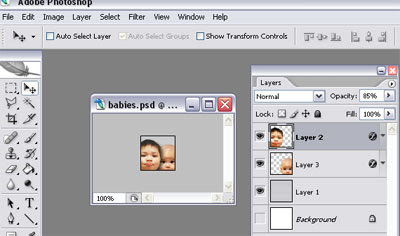
Once you're satisfied with the pic, goto IMAGE > select IMAGE SIZE > type 16 x 16 pixels > press OK.
Then goto FILE > Save As > Choose PNG.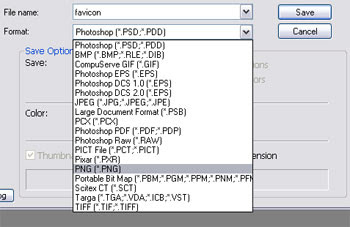
I named my file favicon (meaning favourite icon). DONE.
Upload to Blogger.com
Go to Blogger.com blog and create a new post. Do not publish it. Upload the PNG file using the Blogger photo icon.
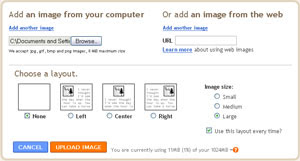
Once upload, switch to the "Edit HTML" tab if your Compose tab is selected. You will see something like this:

Save draft. Copy the highlighted in RED right after src into a Notepad or another text editor.
Go to LAYOUT tab at Blogger.com and select "Edit HTML". Remember to backup your original scripting (I copy paste the entire HTML script into text editor).
Look in the HTML for a tag that says "/head" and right below it, type these two lines:
 (click on image to enlarge)
Once you have those line typed into the template, copy-paste the line after the src (highlighted in RED) into the two lines where the href=" is. It should look like this:
 (click on image to enlarge)
Click SAVE TEMPLATE and now you have your very own new custom favicon showing on the address bar whenever you visit your blog.
 *Tadaa...*
.........................................................................................................................................
Another completely random pic:
 My poor hp
Got ravaged by the cheekies.~ Dolzer promised a month ago to get me new skin. Each week something would fall out from the old skin. Hope to get it for good this coming weekend.


 Tools & papers
 ).
).


 Rough sketch
 The finished work!
 Closer look
 Porky came to inspect
 Nibbled on his tag
 Yum yum... Approved!
 Inspecting gift to Ma ma
 Got bored so played with his Dinosaurs
 The characters
 Pencil sketch first
 Completed work with a little touch-up
 Folded side
 Stick on prezzies
 Tadaa
Tadaa  Chicky came back
 Porky got tagged by Zzz-Monster
 Chicky cheekily telling me he brushed his teeth


